Strip anatomy and types
A strip does not keep one fixed shape. Flight Strips chooses a presentation that fits the flight’s bay and the controller layout. The underlying flight remains the same; the displayed boxes change so the information needed for the current stage is visible.
Box names
Section titled “Box names”Not every strip type contains every box. These are the names used throughout the documentation:
| Box | What it displays |
|---|---|
| SI | Your position’s ownership relationship to the strip and any pending handoff. See Ownership and handoffs. |
| Callsign | The aircraft callsign. On operational strips, the next frequency or position can appear beneath it prefixed by :. |
| A/C type | Aircraft type and, where shown, wake-turbulence category. |
| Registration | Aircraft registration, shown below the aircraft type on apron strips. |
| Destination | Destination aerodrome. |
| Stand | Assigned or expected parking stand. |
| Squawk | Assigned transponder code. |
| Runway | Assigned arrival or departure runway. |
| TWY | Taxiway or taxi clearance limit. |
| HP | Holding point. |
| SID | Standard instrument departure. |
| Cleared FL | Cleared altitude or flight level. |
| Heading | Assigned heading. |
| EOBT | Estimated off-block time. |
| TOBT | Target off-block time. |
| TSAT | Target start-up approval time. |
| CTOT | Calculated take-off time. The box is blank when the flight has no CTOT to display. |
| QNH | Current pressure setting decoded from the airport METAR. |
| POB | Persons on board. |
| Status | GROUND or AIRBORNE on a control-zone strip. |
| Language | Pilot language recorded on a control-zone flight plan. |
| FPL type | Flight-plan type recorded for a control-zone flight. |
Some boxes are intentionally blank. Where described below, a blank box is still clickable and opens the flight plan.
Departure strip types
Section titled “Departure strip types”Before clearance
Section titled “Before clearance”The pre-clearance strip is used for flights that have not moved to CLEARED. It has no SI box because it is a clearance-delivery work item rather than an owned operational strip.
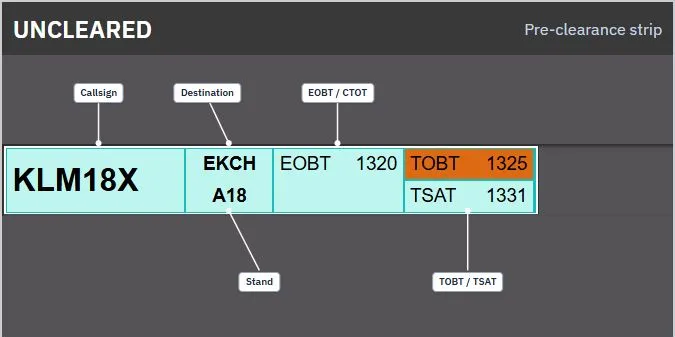
Left to right:
| Callsign | Destination / Stand | EOBT / CTOT | TOBT / TSAT |
|---|
The destination and stand share one box. EOBT and CTOT share another; TOBT and TSAT share the last.
Cleared summary
Section titled “Cleared summary”The cleared summary shown on the clearance layout adds ownership while retaining the time-focused clearance view.
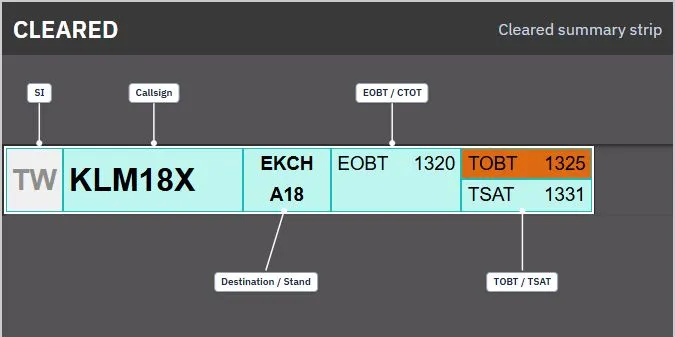
Left to right:
| SI | Callsign | Destination / Stand | EOBT / CTOT | TOBT / TSAT |
|---|
Compact clearance strip
Section titled “Compact clearance strip”When another layout shows clearance traffic in a narrow bay, Flight Strips uses this compact form:
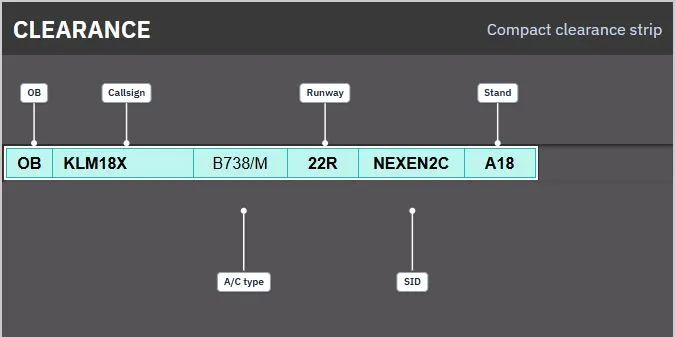
| OB | Callsign | A/C type | Runway | SID | Stand |
|---|
OB is the identifier displayed in the first box of this strip type. It is not the ownership SI box.
Start-up, pushback and de-ice
Section titled “Start-up, pushback and de-ice”The same presentation is used in the implemented STARTUP, PUSHBACK and DE-ICE bays.
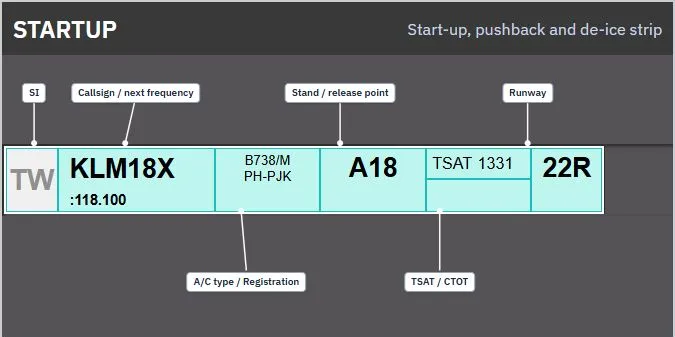
| SI | Callsign / next frequency | A/C type / Registration | Stand or release point | TSAT / CTOT | Runway |
|---|
The stand box displays the release point instead of the stand once a release point exists.
Apron departure taxi
Section titled “Apron departure taxi”Apron controller layouts use this departure-taxi presentation:
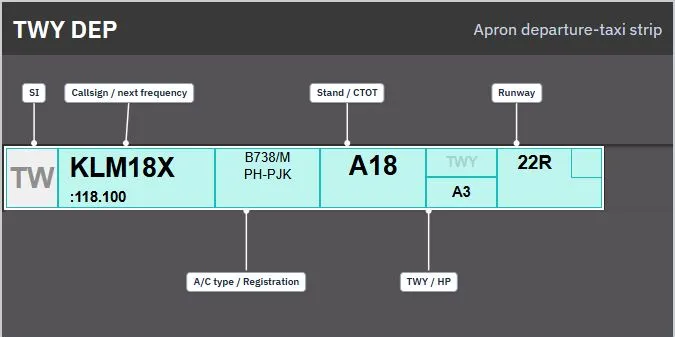
| SI | Callsign / next frequency | A/C type / Registration | Stand / CTOT | TWY / HP | Runway |
|---|
The TWY/HP box changes its emphasis depending on whether the stored release point is a taxiway or holding point.
Tower and ground departure taxi
Section titled “Tower and ground departure taxi”Tower and ground layouts use the more detailed departure strip for departure traffic in TWY-DEP, RWY-DEP and AIRBORNE:
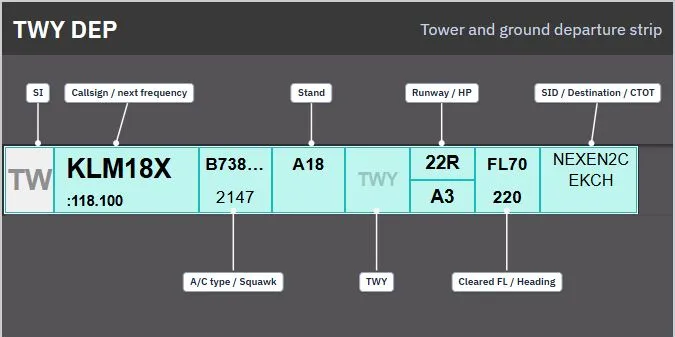
| SI | Callsign / next frequency | A/C type / Squawk | Stand | TWY | Runway / HP | Cleared FL / Heading | SID / Destination / CTOT | | — | — | — | — | — | — | — | — | — |
The last box stacks SID, destination and CTOT. A red cleared-flight-level box indicates that the requested altitude violates an active ECFMP prohibited-level restriction. A red destination section indicates an active ECFMP ground-stop restriction.
Arrival strip types
Section titled “Arrival strip types”Final, runway and taxi arrival
Section titled “Final, runway and taxi arrival”The tower and ground layouts use one arrival presentation in FINAL, RWY-ARR and TWY-ARR:
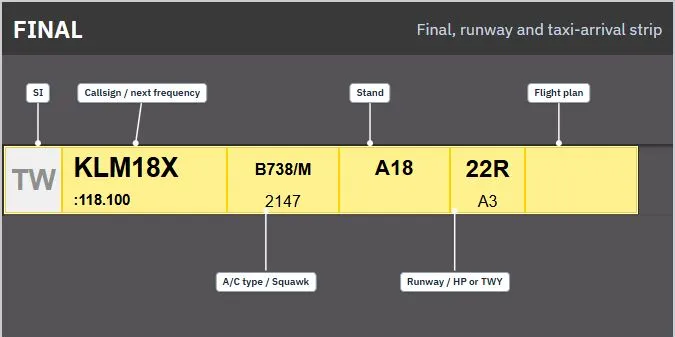
| SI | Callsign / next frequency | A/C type / Squawk | Stand | Runway / HP or TWY | Flight plan |
|---|
The final flight-plan box is intentionally blank. Click it to open the flight plan. The runway box controls runway-clearance or confirmation actions only while the strip is in FINAL or RWY-ARR and owned by your position.
Apron arrival
Section titled “Apron arrival”Apron layouts use a registration-focused arrival strip:
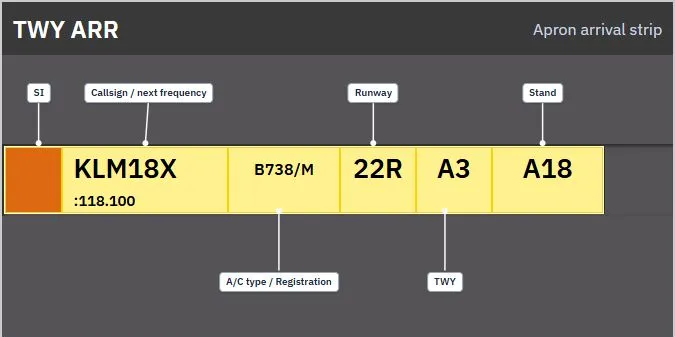
| SI | Callsign / next frequency | A/C type / Registration | Runway | TWY | Stand |
|---|
Compact arrival and pushback strips
Section titled “Compact arrival and pushback strips”Compact strips are used where a full strip is not required. The left identifier distinguishes their purpose:
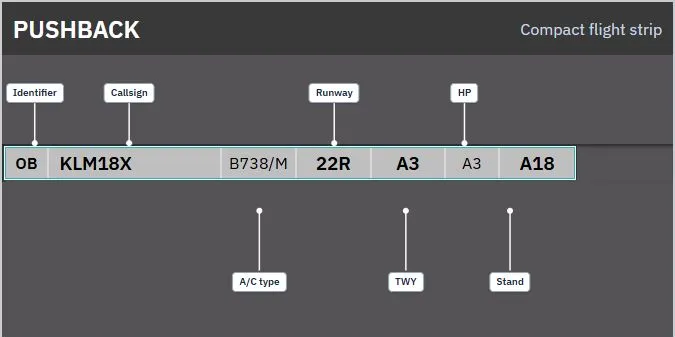
| Identifier | Callsign | A/C type | Runway | TWY | HP | Stand |
|---|
The implemented controller layouts currently show OB for compact pushback traffic and LA for locked arrival traffic. A locked arrival strip is read-only.
Arrival stand assignment
Section titled “Arrival stand assignment”Click an arrival strip’s Stand box to open the stand assignment dialog. Existing ownership and validation restrictions still apply. The inner panel opens empty when no stand is assigned; otherwise, the assigned stand’s area opens.
Select A-H to display the stands in that area. C and D both show the combined C+D panel. RI, RII, RIII, W1, SAS, SOUTH, WEST, and HANGAR are direct options: selecting one clears the inner panel and highlights only that option. HANGAR assigns the general hangar area, not a specific spot.
When automatic stand assignment is enabled:
- AUTO ASSIGN is selected in green by default, even if a stand is already assigned. Click it or ASSIGN (AUTO) to request automatic assignment.
- Selecting an area or editing the stand switches to manual mode. The selected area turns green and AUTO ASSIGN turns grey.
- Selecting a stand highlights it in green and fills the white field. Nothing is assigned until ASSIGN is pressed. Its label shows the stand in smaller parentheses, for example ASSIGN (B6). ASSIGN is disabled if the manual field is empty.
- Clicking AUTO ASSIGN from manual mode reactivates automatic mode without submitting. Click it again, or ASSIGN, to request allocation.
- ERASE clears the entry and panel, removes other highlights, and restores AUTO ASSIGN’s green selection without submitting.
- A pending manual assignment highlights the strip’s stand box yellow. Automatic assignments do not receive that yellow highlight. Conflicts retain their orange background, and incompatible manual requests still require explicit override confirmation.
ESC or Escape cancels. Enter submits the current selection. Without automatic stand assignment enabled, AUTO ASSIGN is disabled and ASSIGN updates the stand directly; an empty entry clears the stand.
Dialog controls and dragging
Section titled “Dialog controls and dragging”Stand assignment, MEM AID, and MESSAGES dialogs use raised button bevels with light top/left edges and dark bottom/right edges, and recessed text fields.
When dragging strips, the released strip settles in 100 ms. Other strips slide and cross-bay insertion gaps open in 150 ms.
Control-zone strip
Section titled “Control-zone strip”The control-zone strip is a separate VFR-oriented presentation:
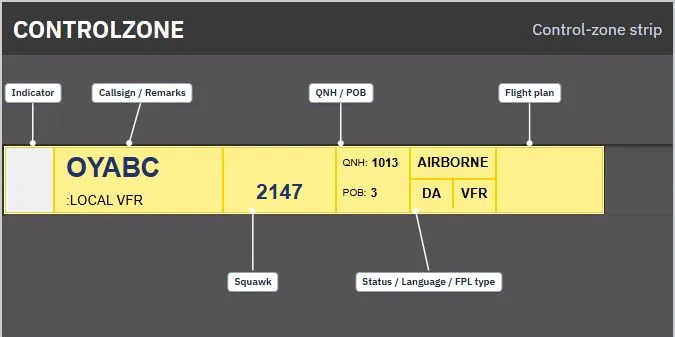
| Indicator | Callsign / Remarks | Squawk | QNH / POB | Status / Language / FPL type | Flight plan |
|---|
The first box is a fixed white indicator in the current implementation, not the normal ownership SI. The last box is intentionally blank and opens the flight plan.
At EKCH, the displayed status changes from GROUND to AIRBORNE when the reported altitude is more than 200 feet above the configured field elevation of 17 feet. If the altitude is unavailable—or the airport is not EKCH—the displayed status is GROUND.
Non-flight strips
Section titled “Non-flight strips”Tactical strips
Section titled “Tactical strips”Flight Strips also renders tactical items that are not flight plans:
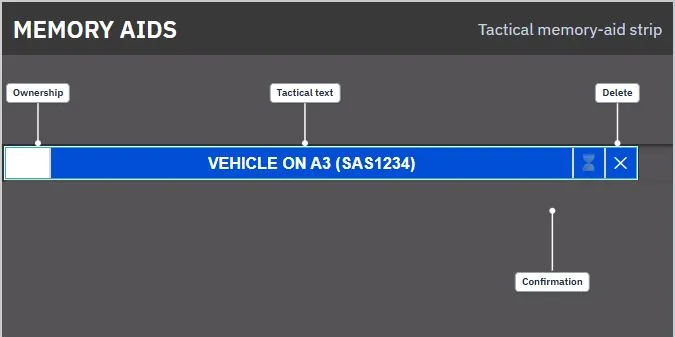
- Memory aid: blue, with its label and optional aircraft reference. It includes a confirmation cell when another controller needs to acknowledge it.
- Crossing: yellow, with its label and optional aircraft reference.
- START and LAND: orange runway-action reminders with their type, label and optional aircraft reference.
When you own a tactical strip, it has a white ownership cell on the left and a delete box on the right. Clicking the body marks or unmarks it. A controller who does not own it can open its ownership menu and use FORCE ASSUME.
Message strips
Section titled “Message strips”A message strip contains three boxes:
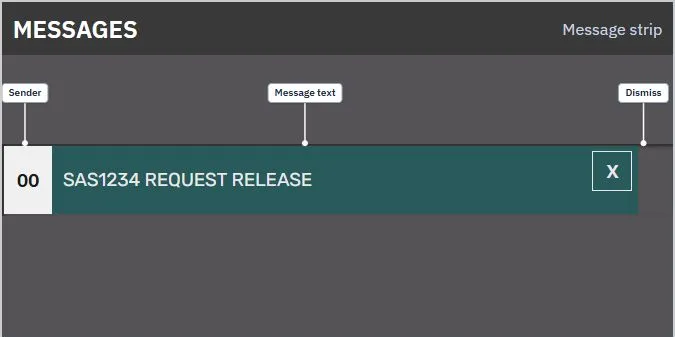
| Sender indicator | Message text | Dismiss |
|---|
The sender indicator represents a system, broadcast or personal message. The X box dismisses the message from the board.